How To Use Camera Settings – Samsung Galaxy Tab 4
Learn how to use camera settings on your Samsung Galaxy Tab 4. Not all of the following options are available in both still camera and video camera modes.
Apple, Gadgets, Android, Microsoft
Learn how to use camera settings on your Samsung Galaxy Tab 4. Not all of the following options are available in both still camera and video camera modes.
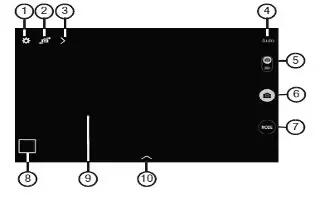
Learn how to use camera on your Samsung Galaxy Tab 4. Use your devices built-in camera and camcorder to take photos and record videos.
Learn how to use music player on your Samsung Galaxy Tab 4. Your phone has a built-in music player that lets you play all your favorite tracks.
Learn how to use playlists in music app on your Samsung Galaxy Tab 4. Personalize your music experience by creating music playlists.
Learn how to use play music app on your Samsung Galaxy Tab 4. The Music app plays songs stored on your tablet or an installed memory card.
Learn how to use Google play music on your Samsung Galaxy Tab 4. You can listen to music by using devices built-in speakers, through a wired headset.
Learn how to use hangouts on your Samsung Galaxy Tab 4. Hangouts is a free, web-based application for instant messaging offered by Google.
Learn how to use Google Plus on your Samsung Galaxy Tab 4. Google+ makes messaging and sharing with your friends a lot easier.
Learn how to compose and send Email on your Samsung Galaxy Tab 4. Use Email to view and manage all your email accounts in one application.
Learn how to use Email Settings on your Samsung Galaxy Tab 4. Use the Email Settings to configure your Email preferences.
Learn how to use Email on your Samsung Galaxy Tab 4. Use Email to view and manage all your email accounts in one application.
Learn how to use Gmail on your Samsung Galaxy Tab 4. Send and receive email with Gmail, Googles web-based email.
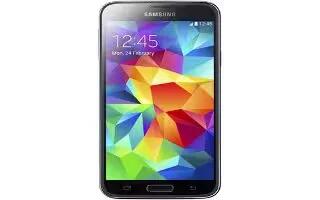
Learn how to customize Home Screen on your Samsung Galaxy S5. You can customize your Home screen by doing the following:
Learn how to use Favorite Contacts on your Samsung Galaxy Tab 4. Mark contact records with a gold star icon to identify them as favorites.
Learn how to use Groups on your Samsung Galaxy Tab 4. Assign contacts to Groups to make searching for contacts faster or to quickly send messages to group members.
Learn how to Import And Export Contacts on your Samsung Galaxy Tab 4. To back up and restore your contacts information.
Learn how to Share Contacts Information on your Samsung Galaxy Tab 4. You can send a contacts information by way of Bluetooth to other Bluetooth devices.
Learn how to Link Contacts on your Samsung Galaxy Tab 4. Your device can synchronize with multiple accounts, including Google, Corporate Exchange.







