How To Setup Microsoft Exchange Account On iPhone 5
How To Setup Microsoft Exchange Account On iPhone 5
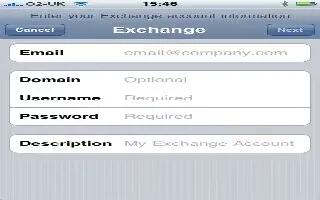
Microsoft Exchange provides email, contact, tasks, and calendar information that you can automatically sync wirelessly to iPhone. You can set up an Exchange account directly on iPhone.
- Set up an Exchange account on iPhone: Go to Settings > Mail, Contacts, Calendars. Tap Add Account, and then tap Microsoft Exchange.
- Ask your service provider or administrator what settings you should use.
Note
This article will work on all iPhones using iOS 6; including iPhone 3GS, iPhone 4, iPhone 4S, and iPhone 5.





 RSS - All Posts