How To Connect Samsung Galaxy S3 with Windows Media Player
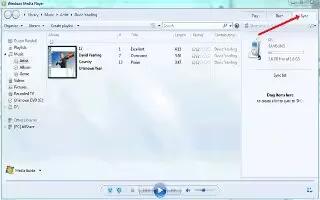
How To Connect Samsung Galaxy S3 with Windows Media Player
Learn how to connect Samsung Galaxy S3 with Windows Media player. You can connect your device to a computer with a USB cable. Do not disconnect the USB cable from a computer while the device is transferring or accessing data. Doing so may result in data loss or damage to the device. For best results, connect the USB cable directly to a USB port on a computer. Data transfers may fail when using a USB hub. You can connect with Windows media player, follow the simple steps below.
How to connect with Windows Media Player
- Ensure that Windows Media Player is installed on your computer.
- Connect your device to a computer with a USB cable.
- Open Windows Media Player and synchronise music files.
How to connect as a media device
You can connect your device to a computer and access media files stored on your device.
- Connect your device to a computer with a USB cable.
- Tap the indicator icons area and drag it downwards to open the notifications panel.
- Select Connected as a media device, and then select Media device (MTP).
- Transfer files between your device and the computer.





 RSS - All Posts